Someone Is Impersonating Me on Instagram: How to Report & What To Do When Instagram Isn't Doing Anything
Finding a fake Instagram account wearing your name and using your pictures is unsettling, and so is reporting it only to hear nothing back from Instagram. This guide covers both: how to report an Instagram impersonator properly, what actually works when Instagram isn't doing anything, and how to protect the people who trust you so the next fake account fools no one.
Last updated: July 13, 2026
How to tell if someone is impersonating you on Instagram
A few signs usually give a fake account away:
- A username that's nearly identical to yours, with one character changed or a suffix like "_official" or "_new" added.
- Your profile photo and posts copied directly, sometimes cropped or mirrored to avoid detection.
- Your bio reused word for word.
- The account following your own followers, then messaging them as if it were you.
- Messages claiming the sender "lost access to their main account," is running a giveaway, or needs money, gift cards, or crypto urgently.
- An account describing itself as your "backup" or "new" account when you never created one.
Not every lookalike is malicious. Fan accounts and parody accounts are generally fine as long as they don't claim to actually be you or pass themselves off as your real profile. Impersonation specifically means an account presenting itself as genuinely you.
Whether someone made a fake account of you, is using your photos on Instagram, is messaging your friends pretending to be you, stole your identity, cloned your account, or a catfish is using your pictures: it's the same problem, and the steps below fix it.
Step 1: Collect evidence before you report
Before you tap report, take a few minutes to document everything. Capture:
- The exact fake username and the profile URL.
- Full-profile screenshots, including the bio and grid.
- Side-by-side screenshots comparing your real posts to the copied ones.
- Screenshots of any scam messages the account has sent (ask recipients to forward them to you if you weren't the one messaged).
- The date and time you first noticed the account.
Evidence matters for several reasons: the account can disappear or go private the moment it's reported, Instagram may come back asking for more information, your followers deserve proof it's fake, and if money changed hands, your bank or the police will need documentation.
Step 2: How to report someone impersonating you on Instagram
Option A: Report it directly in the app
- Open the impersonating profile.
- Tap the ••• menu in the top right.
- Tap Report.
- Tap Report account.
- Select "It's pretending to be someone else."
- Select "Me."
- What's the best way to describe the problem? Select "Scam or fraud."
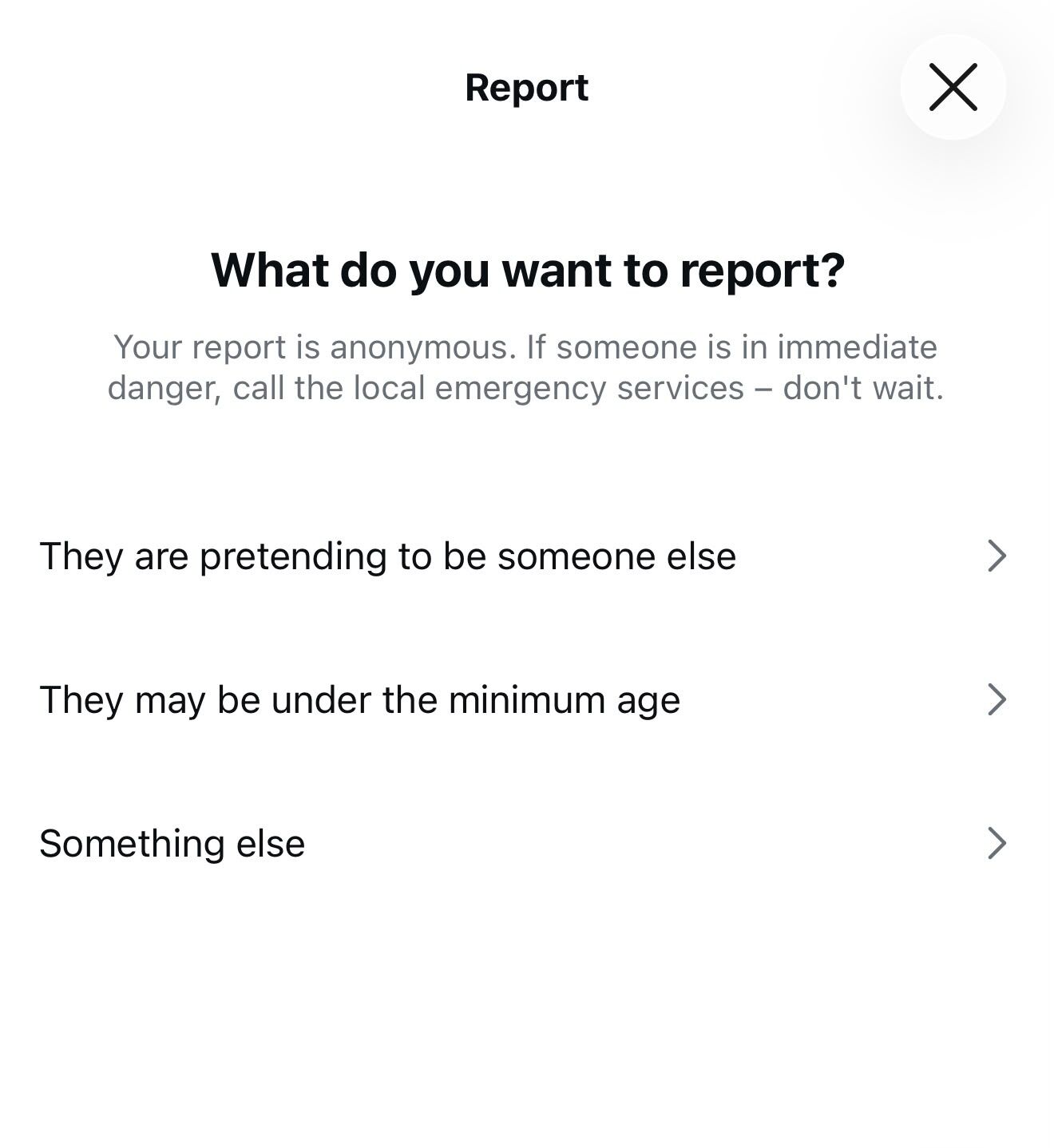
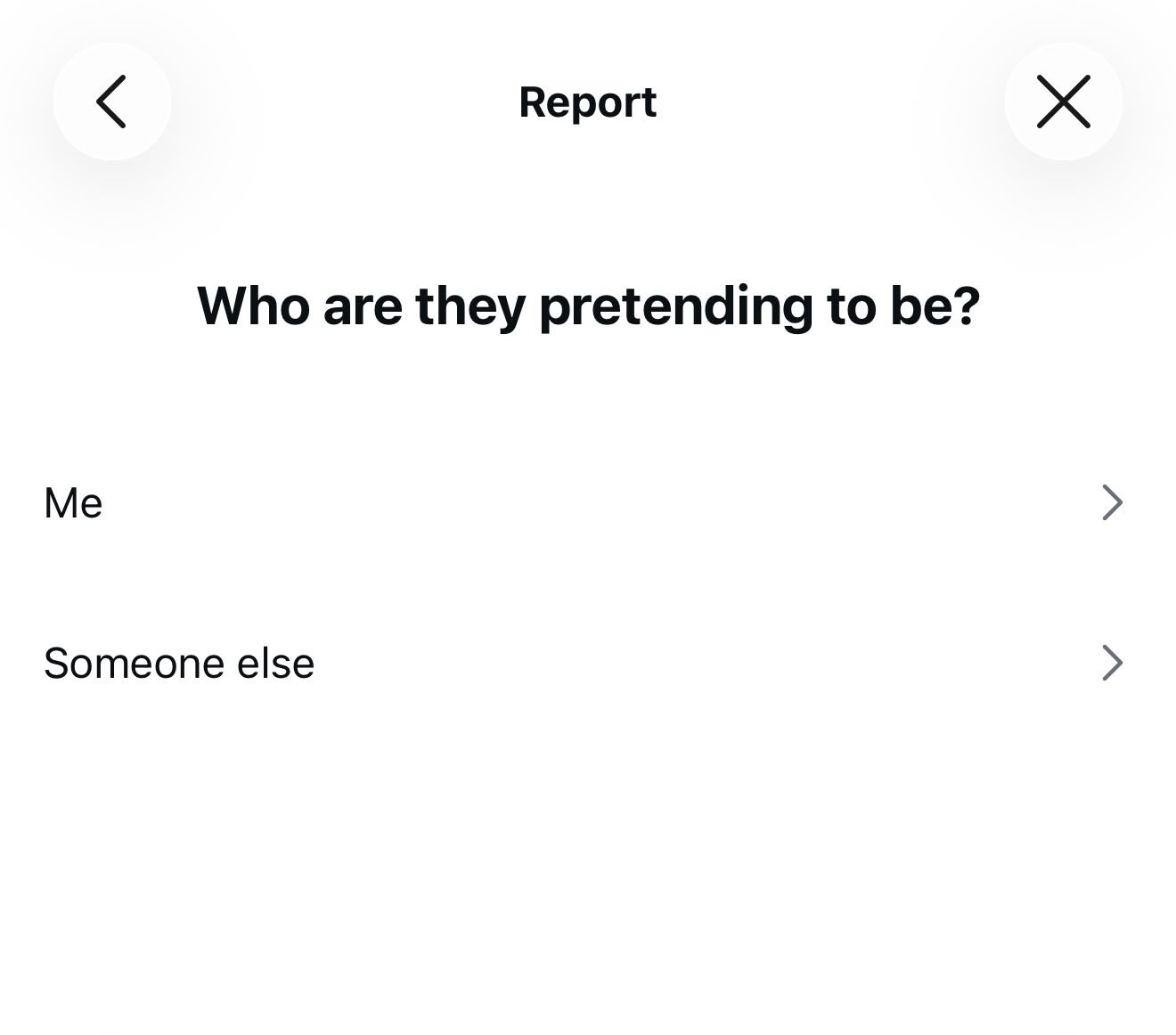
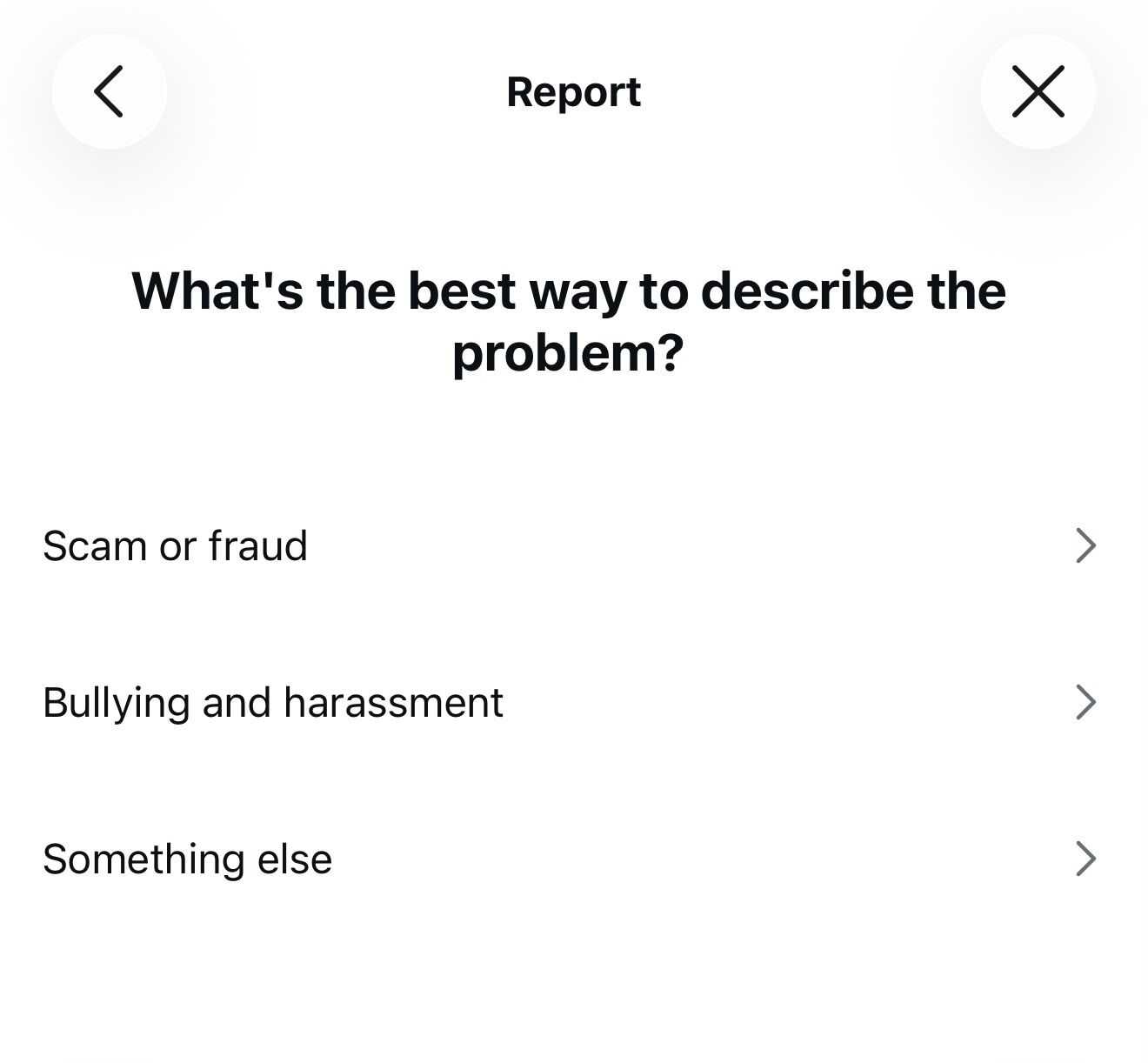
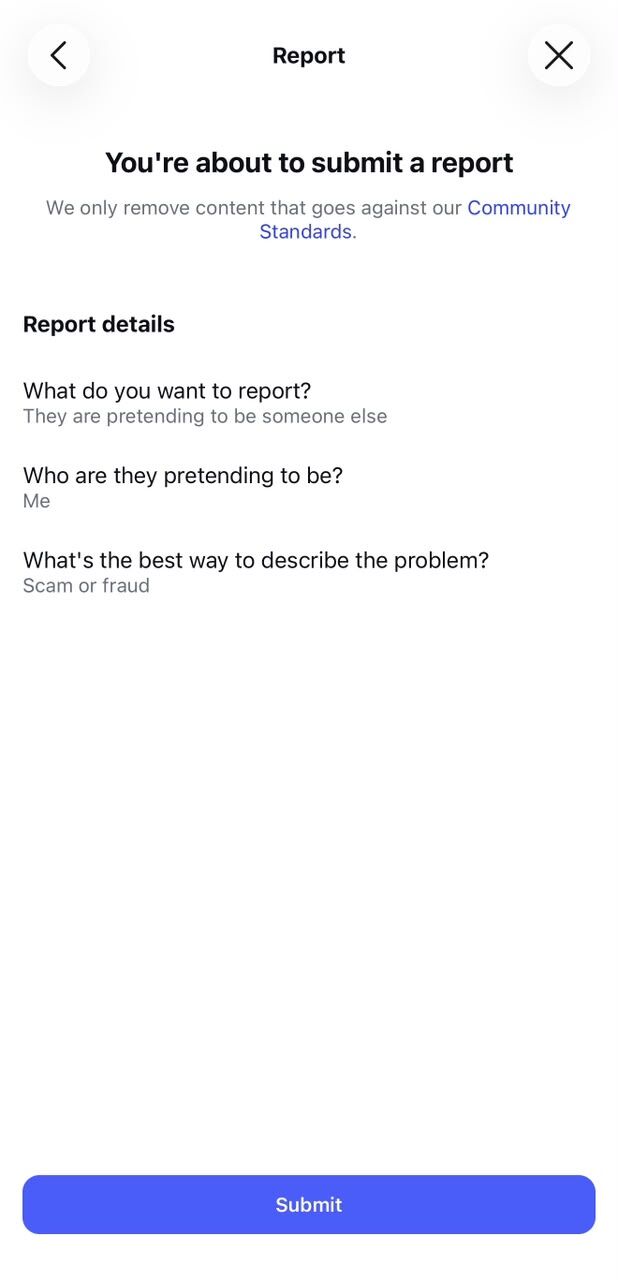
This report is anonymous; the account is never told who filed it.
Option B: Use Instagram's dedicated impersonation report form
If you don't have an Instagram account, or the fake profile has blocked you, use Instagram's dedicated impersonation report form. It asks for your name, your email, the fake account's username, and a photo of a government-issued ID. Including ID verification generally strengthens the report and helps Instagram confirm you're the real person being impersonated.
Official Instagram impersonation report formOption C: Report individual scam messages
If the fake account is messaging people directly, open the conversation, long-press the specific message, and report it. This flags the message content itself in addition to the account.
If it's a business or brand being impersonated
Brands and public figures can also file a report through Meta's trademark and copyright infringement forms as a parallel route alongside the standard impersonation report, which can be useful when a fake account is using a registered brand name or logo.
Step 3: Warn the people who trust you, right away
While your report is being reviewed, don't wait to protect your audience. Post a story and a feed post that names the exact fake username and includes a screenshot of it, so people can recognize it at a glance.
- Clearly state what you will never ask for: money, gift cards, cryptocurrency, or verification codes.
- Ask your followers to report the fake account too.
- Don't engage directly with the impersonator; it rarely helps and can tip them off to switch tactics.
The catch is that warnings don't last. A story disappears in 24 hours and a feed post gets buried within days, while a new fake account can be created in minutes. A one-time warning protects people today, but not next month. That's what the next step is for.
Step 4: Set up a permanent warning tied to your name, always visible wherever people trust you
Reporting removes one fake account. It doesn't stop the next one, and your warning posts and stories disappear in days while fake accounts keep appearing.
An Anti-Scam Page is a permanent warning tied to your name, always visible wherever people trust you.
One page that:
- Shows what you'll never ask for, so the moment a "you" asks for money, gift cards, or codes, everyone knows it's fake.
- Lists your official accounts, website, and everything else that's officially yours; anything not on the page is instantly suspect.
- Lets anyone check an account claiming to be you, and report fakes to the right platform in seconds.
Set it up once. Link it in every bio. It keeps protecting you no matter how many fake accounts appear later.
What happens after you report
Once your report is submitted, Instagram reviews it and one of three things typically happens:
- The account is removed.
- The account is restricted in some way.
- No action is taken, if Instagram determines it doesn't clearly violate policy.
There's no guaranteed timeline; it can take anywhere from a few hours to several days, sometimes longer. Reports filed through the ID-verified impersonation form tend to be the most effective. While you wait, keep directing people to your real account and your Anti-Scam Page.
Instagram Isn't Doing Anything? Do This Next
Getting a rejection, or just silence, from Instagram is frustrating, but it's a normal first step for many people who successfully got a fake account removed. Here's exactly what to try, in order.
Instagram rejected my ID: the name doesn't match
Instagram's impersonation form requires a government-issued ID, and it frequently rejects reports when the name on the ID doesn't exactly match the name on the Instagram profile. The most common case: you go by a nickname or shortened name on Instagram while your ID shows your full legal name, for example Ray vs Raimondo, or a married name that isn't on your ID yet.
What to do:
- Re-submit the form and use the description field to explicitly explain the name variant: "My legal name is Raimondo Ferretti. I am known as Ray Ferretti, which is the name on my Instagram profile."
- If you have a secondary document that shows the known-as name (a bank card, a professional ID, a utility bill), attach it alongside your government ID.
- Make sure your ID photo is clear, uncropped, and fully legible with your name and photo visible without glare.
- If rejected again, try re-filing selecting a different reporter option, for example having a representative or trusted contact submit on your behalf, and pursue the copyright route below in parallel.
Instagram said it "doesn't violate our Community Guidelines"
This is the single most common complaint from impersonation victims. Automated review frequently returns a "no violation" decision within minutes, even for accounts that are obviously fake, because the system looks for specific signals that a human reviewer would catch instantly. A rejection is not a final answer.
What to do:
- Use the in-app appeal option on the decision if it's offered. Appealing flags the case for human review.
- Re-report the account under a different category that matches what the account is actually doing: Scam or fraud if it's messaging people for money; Nudity or sexual activity if it's posting inappropriate content. Different categories route to different review queues.
- Report the individual scam messages, not just the profile. Open any conversation the fake account had with your contacts, long-press the message, and report it; message reports go through a separate review path from profile reports.
- Ask several friends or followers to independently report the account using their own accounts. Multiple unrelated reports on the same account can trigger a fresh human review.
- File Instagram's ID-verified web form at help.instagram.com even if you already reported in-app. The ID-verified queue is reviewed differently and carries more weight than an anonymous flag.
The copyright route: report your stolen photos (works when impersonation reports fail)
This applies to individuals, not just brands. If you took those photos yourself, or if they were taken of you and you published them, you own the copyright, and that ownership opens a separate, often more powerful reporting path.
When an impersonation report gets rejected, a copyright (DMCA) report on the stolen photos is frequently the most effective next move. Intellectual property reports carry legal obligations and are handled by a completely different team than Community Guidelines reports.
- Use Meta's copyright report form (available in the Help Center) to report each stolen photo individually.
- For each photo: provide a link to your original post and a link to the infringing post on the fake account, and state clearly that you are the copyright owner.
- Understand what this achieves: the photos get removed, not automatically the entire account. But accounts that accumulate repeated IP strikes get disabled, and removing every stolen photo typically guts the fake profile. It can't impersonate you without your face.
- If the impersonator is also using a brand name, logo, or business identity, the trademark form is an additional route to file in parallel.
A fake account is using my photos to post inappropriate or sexual content
This variant, a fake account using your pictures with sexualized captions, suggestive links, or explicit content, is more distressing than standard impersonation, and the response is slightly different.
What to do, in order:
- Report the account AND every individual post under the Nudity or sexual content category; this queue moves faster than the impersonation queue and doesn't require ID.
- File a copyright report on every stolen photo using the process above.
- If any image involved is intimate or sexualized imagery of you specifically, use StopNCII.org, a free hash-matching service backed by Meta that blocks the images across Meta platforms without you having to send the actual image to anyone.
- Document everything before reporting: screenshots of the posts, dates, any messages, because content can disappear quickly once reports start.
- If there is blackmail, threats, or sextortion involved, this is a crime. Preserve your evidence and contact the police. Do not pay and do not negotiate; payment almost never ends a sextortion attempt.
Escalation ladder: when reporting keeps failing
Most fake accounts are removed at step 1 or 2. If yours hasn't been, work through this ladder:
- After the first rejection: Re-file the ID-verified web form with stronger evidence; add side-by-side screenshots comparing your real posts to the copied ones, and include any scam messages the fake account sent.
- In parallel with step 1: File a copyright report on the stolen photos. These run on a separate legal track and are handled by a different team.
- After around two weeks of no action: If you're in the EU or UK, exercise your data-protection rights. Meta is legally obligated to respond to complaints about unlawful processing of your personal data, specifically your name and photos. You can escalate to your national data protection authority if they don't act. The EU Digital Services Act also gives users a right to appeal content moderation decisions and use out-of-court dispute settlement bodies.
- File a consumer protection complaint: In the US, report to the FTC at reportfraud.ftc.gov, especially if money was scammed from anyone using your identity. Equivalent agencies exist in most countries.
- Police report: If there's fraud, threats, sextortion, or a pattern of repeated targeted impersonation, file a police report and bring your full evidence file. A report also supports victims' fraud claims with their banks.
- A lawyer's letter to Meta: For persistent cases involving defamation or ongoing financial fraud, a formal legal letter can move cases that platform reports alone have not.
Steps 3–6 are for persistent cases. The majority of fakes are resolved by step 2. This is general information and not legal advice; for your specific situation, consult a lawyer in your jurisdiction.
How long does this take? Realistic timeline
- Within 24–48 hours: Many in-app reports receive an automated decision. If it's a rejection, that's the prompt to move to the ID-verified form.
- Within 3–7 days: ID-verified form reports are typically reviewed. This is the most effective standard route and the one most likely to produce a different result than an in-app flag.
- By 2 weeks: If nothing has happened, re-file the ID-verified form with stronger evidence and start the copyright route on the stolen photos.
- Beyond 2–4 weeks with no action: Move up the escalation ladder above. There is no guaranteed timeline from Instagram, and outcomes vary, but persistent, well-documented cases almost always find resolution at some level.
Is impersonating someone on Instagram illegal?
It depends on where you and the impersonator are located. Many jurisdictions criminalize online impersonation, particularly when it's used to commit fraud or to harass someone. Rules and enforcement vary widely from country to country and even state to state.
Consider contacting the police, in addition to reporting the account to Instagram, if:
- Money was stolen from you or from someone the impersonator contacted.
- You're being threatened or blackmailed.
- Private or intimate content has been leaked or shared without consent.
- You're facing repeated, targeted fake accounts despite reporting them.
This information is general in nature and is not legal advice. If you're dealing with a serious case, speak with a local lawyer or law enforcement about your specific situation.
How to prevent Instagram impersonation in the future
- Keep an Anti-Scam Page linked in your bio so anyone can verify your real accounts in seconds.
- Apply for Meta's official verification if you're eligible.
- Periodically audit which photos and personal details are publicly visible.
- Tell your audience your rules once: what you will and won't ever ask for, so it's easy to recognize a fake.
- Search your own name and username occasionally to catch lookalike accounts early.
- Secure your real account with a strong, unique password and two-factor authentication.
Frequently asked questions
Why do scammers impersonate people on Instagram?
Trust is the whole trick. Followers are far more likely to send money, click a link, or believe a fake investment pitch when it appears to come from someone they already follow and recognize. The more established your real account is, the more useful it becomes to an impersonator.
Scams that started on social media cost people $2.1 billion in 2025 according to FTC data; see our impersonation statistics page for all the numbers.
Can someone legally use my name and photos on Instagram?
Technically it's possible for someone to upload public photos and pick a similar name, but doing so to impersonate you violates Instagram's Community Guidelines and can amount to a crime in many places, especially if it involves fraud, harassment, or an attempt to deceive people for financial gain.
Will the impersonator find out that I reported them?
No. Instagram reports are confidential. The account you report is never told who submitted the report, so reporting will not expose your identity to the person running the fake profile.
Can my followers report the fake account for me?
Yes. Anyone who spots the account can report it and select the "Someone I know" or "It's pretending to be someone else" option. Multiple independent reports about the same account can help it get reviewed and can support your own report if you've already filed one.
Can I report impersonation without an Instagram account?
Yes. Instagram's dedicated impersonation report form at help.instagram.com does not require you to be logged in or to even have an Instagram account. It's the option to use if the impersonator has blocked you or you never used Instagram in the first place.
What if the fake account has blocked me?
Being blocked doesn't stop you from reporting. Use another logged-in account, ask a friend or follower to view and report the profile, or use Instagram's impersonation report form, which works even if you can't see or interact with the account directly.
What if a fake account is messaging my friends for money?
Report the account and forward or screenshot the specific scam messages so Instagram can review them individually. Post a public warning naming the fake username so people know not to respond. Anyone who already sent money or personal details should contact their bank and, if the amount is significant, file a police report. Setting up an Anti-Scam Page gives everyone a single place to double check before they act.
If Instagram removes the fake account, can someone just make a new one?
Yes, unfortunately. Removing one impersonating account doesn't stop another from being created with a similar username or the same stolen photos days or weeks later. That's exactly why a permanent, always-up-to-date verification page matters more than any single takedown.
How long does it take Instagram to remove an impersonating account?
There's no fixed timeline. Some reports are actioned within hours, others take days or longer, and outcomes aren't guaranteed. Reports submitted through the ID-verified impersonation form tend to be reviewed more effectively than an in-app report alone.
What's the difference between impersonation and a fan or parody account?
Fan and parody accounts are generally allowed as long as they don't claim to actually be you, don't copy your bio and photos to pass as your real profile, and ideally say "fan account" or "parody" somewhere visible. An account only crosses into impersonation when it presents itself as genuinely being you.
I keep reporting the fake account but nothing happens. What can I do?
Start by using the in-app appeal option on any rejection, then re-report under the category that matches what the account is actually doing, scam or fraud if it's messaging people for money, for example. If you haven't already, file Instagram's ID-verified impersonation form at help.instagram.com; that queue is reviewed differently from an in-app flag and tends to get further. In parallel, file a copyright report on any photos the account stole from you; you own those images, and IP reports are handled by a separate team that often succeeds where community-guidelines reports don't. If nothing moves after two weeks, work through the escalation steps in the section above.
Someone is impersonating me on Facebook too. Is the process similar?
The playbook is the same (evidence, report, warn, permanent warning) but the reporting flow differs by platform. See our guide to someone impersonating you on Facebook.
Protect your name before the next fake account appears
Reporting handles the fake account you found today. An Anti-Scam Page handles every one you haven't found yet: a permanent warning tied to your name, always visible wherever your followers see you, where anyone can check what's officially yours and report what isn't.